
Organized
Define the layout logically, sort the content by priority. In most cases, in order to emphasize the common-used analysis thoughts, you should organize the information from top to bottom and from left to right, or use progressive interactions. To sum up, put the summary first, then focus on filters, and finally provide details whenever the user needs.

Focused
Put the most important charts and the key scorecards on the top or upper part the page.

Accurate
Keep data accurate, clear and complete.
1. Use the correct chart type.
2. Provide explanations where necessary.


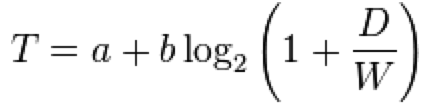 > **Fitts's Law**: The time to acquire a target is a function of the distance to and size of the target. It is proportional to the distance to the target and inversely proportional to the width of the target.
---
## Always-Visible Tools
> **Fitts's Law**: The time to acquire a target is a function of the distance to and size of the target. It is proportional to the distance to the target and inversely proportional to the width of the target.
---
## Always-Visible Tools




 ](https://godban.github.io/browsers-support-badges/)Edge | [
 ](https://godban.github.io/browsers-support-badges/)Firefox | [
 ](https://godban.github.io/browsers-support-badges/)Chrome | [
 ](https://godban.github.io/browsers-support-badges/)Safari | [
 ](https://godban.github.io/browsers-support-badges/)Opera | [
 ](https://godban.github.io/browsers-support-badges/)Electron |
| --- | --- | --- | --- | --- | --- |
| Edge | last 2 versions | last 2 versions | last 2 versions | last 2 versions | last 2 versions |
Polyfills are needed for IE browsers. We recommend [@babel/preset-env](https://babeljs.io/docs/en/babel-preset-env) for it. You can set `targets` config if you are using [umi](https://umijs.org/).
> Dropped support of IE8 after `antd@2.0`. Dropped support of React 15 and IE9/10 after `antd@4.0`. Dropped support of IE after `antd@5.0`.
## Version
- Stable: [](https://www.npmjs.org/package/antd)
You can subscribe to this feed for new version notifications: https://github.com/ant-design/ant-design/releases.atom
## Installation
### Using npm or yarn or pnpm or bun
**We recommend using [npm](https://www.npmjs.com/) or [yarn](https://github.com/yarnpkg/yarn/) or [pnpm](https://pnpm.io/) or [bun](https://bun.sh/) to install**, it not only makes development easier, but also allow you to take advantage of the rich ecosystem of Javascript packages and tooling.
](https://godban.github.io/browsers-support-badges/)Electron |
| --- | --- | --- | --- | --- | --- |
| Edge | last 2 versions | last 2 versions | last 2 versions | last 2 versions | last 2 versions |
Polyfills are needed for IE browsers. We recommend [@babel/preset-env](https://babeljs.io/docs/en/babel-preset-env) for it. You can set `targets` config if you are using [umi](https://umijs.org/).
> Dropped support of IE8 after `antd@2.0`. Dropped support of React 15 and IE9/10 after `antd@4.0`. Dropped support of IE after `antd@5.0`.
## Version
- Stable: [](https://www.npmjs.org/package/antd)
You can subscribe to this feed for new version notifications: https://github.com/ant-design/ant-design/releases.atom
## Installation
### Using npm or yarn or pnpm or bun
**We recommend using [npm](https://www.npmjs.com/) or [yarn](https://github.com/yarnpkg/yarn/) or [pnpm](https://pnpm.io/) or [bun](https://bun.sh/) to install**, it not only makes development easier, but also allow you to take advantage of the rich ecosystem of Javascript packages and tooling.
 ](https://stackoverflow.com/questions/tagged/antd) using the `antd` tag.
As always, we encourage experienced users to help those who are not familiar with `antd`!
---
Title: Advanced
URL: https://ant.design/docs/react/i18n
---
The default language of `antd` is currently English. If you wish to use other languages, follow the instructions below.
## ConfigProvider
`antd` provides a React Component [ConfigProvider](/components/config-provider) for configuring antd locale text globally.
```jsx
import { ConfigProvider } from 'antd';
import frFR from 'antd/locale/fr_FR';
return (
](https://stackoverflow.com/questions/tagged/antd) using the `antd` tag.
As always, we encourage experienced users to help those who are not familiar with `antd`!
---
Title: Advanced
URL: https://ant.design/docs/react/i18n
---
The default language of `antd` is currently English. If you wish to use other languages, follow the instructions below.
## ConfigProvider
`antd` provides a React Component [ConfigProvider](/components/config-provider) for configuring antd locale text globally.
```jsx
import { ConfigProvider } from 'antd';
import frFR from 'antd/locale/fr_FR';
return (
 OK! Now that you know the basics of using antd components, you are welcome to explore more components in the codesandbox. When reporting a bug with ant design, we also strongly recommend using codesandbox to provide a reproducible demo as well.
### 4. Next Steps
During actual real-world project development, you will most likely need a development workflow consisting of `compile/build/deploy/lint/debug/` deployment. You can read the following documents on the subject or use the following scaffolds and examples provided below:
- [Ant Design Pro](https://pro.ant.design/)
- [create-next-app](https://github.com/ant-design/ant-design-examples/tree/main/examples/with-nextjs-inline-style)
- More scaffolds at [Scaffold Market](https://scaffold.ant.design/)
## Test with Jest
If you use `create-react-app` follow the instructions [here](/docs/react/use-with-create-react-app) instead.
Jest does not support `esm` modules, and Ant Design uses them. In order to test your Ant Design application with Jest you have to add the following to your Jest config :
```json
"transform": { "^.+\\.(ts|tsx|js|jsx)?$": "ts-jest" }
```
## Import on Demand
`antd` supports tree shaking of ES modules, so using `import { Button } from 'antd';` would drop js code you didn't use.
## Customize your Workflow
If you want to customize your workflow, we recommend using [webpack](https://webpack.js.org) or [vite](https://vitejs.dev/) to build and debug code. You can try out plenty of [boilerplates](https://github.com/enaqx/awesome-react#react-tools) available in the React ecosystem.
There are also some [scaffolds](https://scaffold.ant.design/) which have already been integrated into antd, so you can try and start with one of these and even contribute.
---
Title: Other
URL: https://ant.design/docs/react/faq
---
Here are the frequently asked questions about Ant Design and antd that you should look up before you ask in the community or create a new issue. We also maintain a [FAQ issues label](http://u.ant.design/faq) for common GitHub issues.
---
## Is there a difference between `undefined` and `null` in the controlled components of `antd`?
**Yes. antd will treat `undefined` as uncontrolled but `null` as controlled component which means empty value of it.**
As input element, React treats both `undefined` and `null` as uncontrolled. When the `value` is converted from a valid value to `undefined` or `null`, the component is no longer controlled, which causes some unexpected cases.
But in antd, `undefined` is treated as uncontrolled, and `null` is used as an explicit empty value of controlled components. To deal with some cases (e.g. `allowClear`) like clearing the `value` when the `value` is non-primitive. If you need a component controlled with the `value` valid, just set the `value` as `null`.
Note: For `options` in `Select-like` components, it is **strongly recommended not** to use `undefined` and `null` as `value` in `option`. Please use `string | number` as a valid `value` in `option`.
## Can I use internal API which is not documented on the site?
NOT RECOMMENDED. Internal API is not guaranteed to be compatible with future versions. It may be removed or changed in some versions. If you really need to use it, you should make sure these APIs are still valid when upgrading to a new version or just lock version for usage.
## Why API request should be strict discussion?
We are cautious when adding APIs because some APIs may not be abstract enough to become historical debt. For example, when there is a need to change the way of interaction, these poor abstractions may cause breaking changes. To avoid such problems, we recommend that new features be implemented through HOCs first.
## `Select Dropdown DatePicker TimePicker Popover Popconfirm` disappears when I click another popup component inside it. How do I resolve this?
This is an old bug that has been fixed since `v3.11.x`. If you're using an older version, you can use `
OK! Now that you know the basics of using antd components, you are welcome to explore more components in the codesandbox. When reporting a bug with ant design, we also strongly recommend using codesandbox to provide a reproducible demo as well.
### 4. Next Steps
During actual real-world project development, you will most likely need a development workflow consisting of `compile/build/deploy/lint/debug/` deployment. You can read the following documents on the subject or use the following scaffolds and examples provided below:
- [Ant Design Pro](https://pro.ant.design/)
- [create-next-app](https://github.com/ant-design/ant-design-examples/tree/main/examples/with-nextjs-inline-style)
- More scaffolds at [Scaffold Market](https://scaffold.ant.design/)
## Test with Jest
If you use `create-react-app` follow the instructions [here](/docs/react/use-with-create-react-app) instead.
Jest does not support `esm` modules, and Ant Design uses them. In order to test your Ant Design application with Jest you have to add the following to your Jest config :
```json
"transform": { "^.+\\.(ts|tsx|js|jsx)?$": "ts-jest" }
```
## Import on Demand
`antd` supports tree shaking of ES modules, so using `import { Button } from 'antd';` would drop js code you didn't use.
## Customize your Workflow
If you want to customize your workflow, we recommend using [webpack](https://webpack.js.org) or [vite](https://vitejs.dev/) to build and debug code. You can try out plenty of [boilerplates](https://github.com/enaqx/awesome-react#react-tools) available in the React ecosystem.
There are also some [scaffolds](https://scaffold.ant.design/) which have already been integrated into antd, so you can try and start with one of these and even contribute.
---
Title: Other
URL: https://ant.design/docs/react/faq
---
Here are the frequently asked questions about Ant Design and antd that you should look up before you ask in the community or create a new issue. We also maintain a [FAQ issues label](http://u.ant.design/faq) for common GitHub issues.
---
## Is there a difference between `undefined` and `null` in the controlled components of `antd`?
**Yes. antd will treat `undefined` as uncontrolled but `null` as controlled component which means empty value of it.**
As input element, React treats both `undefined` and `null` as uncontrolled. When the `value` is converted from a valid value to `undefined` or `null`, the component is no longer controlled, which causes some unexpected cases.
But in antd, `undefined` is treated as uncontrolled, and `null` is used as an explicit empty value of controlled components. To deal with some cases (e.g. `allowClear`) like clearing the `value` when the `value` is non-primitive. If you need a component controlled with the `value` valid, just set the `value` as `null`.
Note: For `options` in `Select-like` components, it is **strongly recommended not** to use `undefined` and `null` as `value` in `option`. Please use `string | number` as a valid `value` in `option`.
## Can I use internal API which is not documented on the site?
NOT RECOMMENDED. Internal API is not guaranteed to be compatible with future versions. It may be removed or changed in some versions. If you really need to use it, you should make sure these APIs are still valid when upgrading to a new version or just lock version for usage.
## Why API request should be strict discussion?
We are cautious when adding APIs because some APIs may not be abstract enough to become historical debt. For example, when there is a need to change the way of interaction, these poor abstractions may cause breaking changes. To avoid such problems, we recommend that new features be implemented through HOCs first.
## `Select Dropdown DatePicker TimePicker Popover Popconfirm` disappears when I click another popup component inside it. How do I resolve this?
This is an old bug that has been fixed since `v3.11.x`. If you're using an older version, you can use `